class: center, middle, inverse, title-slide # Audio recording ## 710 | Week 6 ### Bradley McDonnell ### 2022/02/14 (updated: 2022-02-14) --- # What is sound? Sound is waves of pressure in the air: 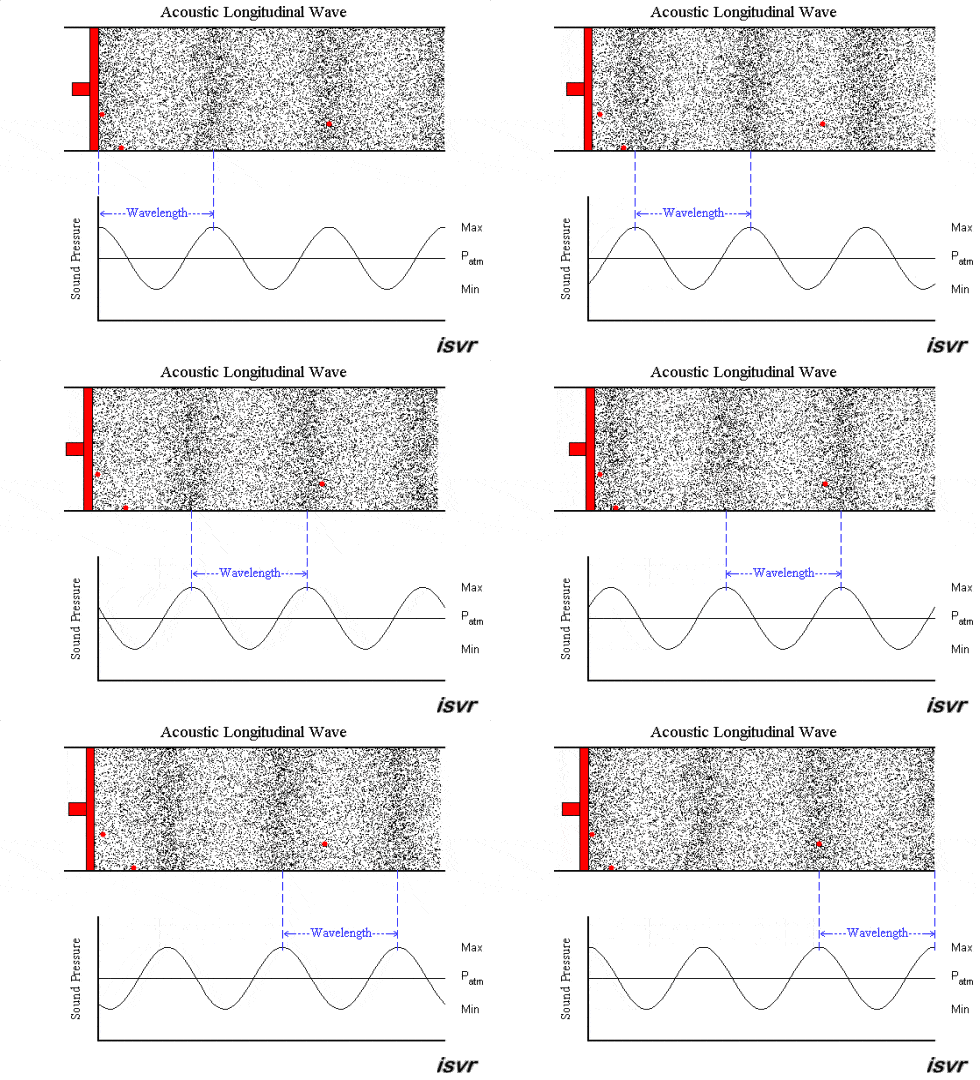 [source](http://bentibbetts.net/wp/?p=8772) --- # What is sound? .pull-left[**Sound is like waves in the ocean:** - High vs. low pitch = frequent vs. infrequent waves - Frequency of a sound wave - Loud vs. quiet = height of the wave - Volume, Amplitude, or Intensity - Loud vs. quiet = closer or farther ] .pull-right[  ] --- # What is sound? <iframe width="560" height="315" src="https://www.youtube.com/embed/hfzCLClVO8g" title="YouTube video player" frameborder="0" allow="accelerometer; autoplay; clipboard-write; encrypted-media; gyroscope; picture-in-picture" allowfullscreen></iframe> [What is sound?](https://youtu.be/hfzCLClVO8g) ??? Don't play in class --- # Keys for audio recording Frequency in Hertz (Hz) or Kilohertz (kHz) - 1,000 Hz = 1kHz Intensity/amplitude/volume in decibels (dB) - Humans hear between 20Hz and 20,000Hz - Microphones should be around the same range! --- # Hearing with our ears <iframe width="560" height="315" src="https://www.youtube.com/embed/T8lKKlnnC6M" frameborder="0" allow="accelerometer; autoplay; encrypted-media; gyroscope; picture-in-picture" allowfullscreen></iframe> [Description of hearing](https://youtu.be/T8lKKlnnC6M) -- 1. Air pressure vibrates eardrum 2. Translated into electrical impulses 3. Electrical impulses sent to the brain ??? Don't play in class --- # Hearing with a microphone <iframe width="560" height="315" src="https://www.youtube.com/embed/PE6Qn4ZiEyo?start=17" frameborder="0" allow="accelerometer; autoplay; encrypted-media; gyroscope; picture-in-picture" allowfullscreen></iframe> [Introducing microphones video](https://youtu.be/PE6Qn4ZiEyo) ??? Play in class until 2:40 after polar patterns --- # Hearing with a microphone - Dynamic and condenser - The anatomy of microphones - Phantom power - Transducer (sound wave > electrical energy) - Microphone Diaphragm - Frequency response - Polar patterns --- # Dynamic vs. condensor microphones .pull-left[**Dynamic** - Rugged - No extra power - Not sensitive ] .pull-right[ **Condenser** - Delicate - Extra power needed - Battery, phantom power (see below) - Very sensitive ] --- # Dynamic vs. condensor microphones <iframe width="560" height="315" src="https://www.youtube.com/embed/Mxp3eCCQyas?start=79" frameborder="0" allow="accelerometer; autoplay; encrypted-media; gyroscope; picture-in-picture" allowfullscreen></iframe> [Dynamic vs. Condensor Microphone](https://youtu.be/Mxp3eCCQyas?t=1m19s) ??? Don't play in class --- # Dynamic microphones ### Which type of microphone do documentary linguists want? --- # Frequency response <iframe width="560" height="315" src="https://www.youtube.com/embed/7TH82dx7Qas?rel=0&showinfo=0&start=14" frameborder="0" allow="autoplay; encrypted-media" allowfullscreen></iframe> [Frequency response tutorial](https://youtu.be/7TH82dx7Qas?t=14s) ### Key concept: Flat vs. Roll off ??? Play in class until 2:40 --- # Polar patterns <iframe width="560" height="315" src="https://www.youtube.com/embed/rYWnSuAxato?start=22" frameborder="0" allow="accelerometer; autoplay; encrypted-media; gyroscope; picture-in-picture" allowfullscreen></iframe> [Polar pattern tutorial](https://youtu.be/rYWnSuAxato?t=22s) See: [additional tutorial on polar pattern](https://youtu.be/0cj18EQQAm8) --- # Polar patterns - Omndirectional - Unidirectional - Cardioid - Super-cardioid - Bidirectional **What about polar patterns in stereo microphones?** --- # Electrical output [Micorphone specifications](https://youtu.be/UYMaRhRt8Ts?t=10s) - Balanced output - [XLR vs. 1/4" vs. 3.5mm](https://youtu.be/ZAKhh8wpXDE?t=19s) - XLR pins (3, 5, 6, 7) - Balanced vs. unbalanced - TS vs. TRS - Microphone pad - Phantom power [Long explanation of reasons for using XLR](https://youtu.be/Z5ElNzY5e1I?t=50) --- class: center, middle, inverse # Hearing is NOT listening --- # Hearing is NOT listening Cocktail party effect <iframe width="560" height="315" src="https://www.youtube.com/embed/iO3jTl0WuS4?rel=0&showinfo=0&start=3" frameborder="0" allow="autoplay; encrypted-media" allowfullscreen> </iframe> [Cocktail party effect](https://youtu.be/iO3jTl0WuS4?t=3s) An example <audio controls> <source src="audio/mono-student-discussion.wav" type="audio/wav"> </audio> ??? Play first 55 seconds --- # Hearing is NOT listening - Ears only hear, brains listen - Mics don't have brains **Documentary linguists need to be the brain!** --- # Two ears, one brain One ear = mono <audio controls> <source src="audio/mono-nsy-segment.wav" type="audio/wav"> </audio> Two ears (like a mouse) = stereo <audio controls> <source src="audio/stereo-nsy-segment.wav" type="audio/wav"> </audio> ### 🎧 Listen with headphones 🎧 Two ears (like a human) = binaural/ORTF - Organisme Francais de Radiodiffusion et de Television - Volume differences across two cardioid mics at 110 degrees - Timing differences at 17cm apart --- # Two ears, one brain ### Compare... <audio controls> <source src="audio/mono-student-discussion.wav" type="audio/wav"> </audio> <audio controls> <source src="audio/ortf-student-discussion.wav" type="audio/wav"> </audio> ### 🎧 Listen with headphones 🎧 --- # Binaural vs. stereo example Binaural vs. stereo <iframe width="560" height="315" src="https://www.youtube.com/embed/5KSMASKjwUI?rel=0&showinfo=0&start=8" frameborder="0" allow="autoplay; encrypted-media" allowfullscreen></iframe> ### 🎧 Listen with headphones 🎧 ??? Don't play in class --- # Interem summary and advice .pull-left[ Recordings can be: - Mono - Stereo - Binaural ] .pull-right[ Microphones have directionality: - Omnidirectional - Unidirectional - Cardioid - Super-cardiod - Bidirectional ] --- class: inverse # Advice When in doubt choose... 1. a **stereo** microphone (cardioid) with an *audio recorder* 2. a **shotgun** microphone (super-cardiodi) with a *video recorder* --- # Reputuable brands for microphones 1. AKG 2. Audio-Technica 3. Rode 4. Sennheiser 5. Shure 6. ... --- # Using microphones for the best quality 1. Monitor recordings 2. Maintain a good *signal to noise ratio* 3. Microphone placement 4. Minimize background noise --- # Monitor recordings .pull-left[  ] .pull-right[ - Monitor recordings (as much as possible) - But *don't* continuously adjust sound levels - It's okay to peak when sound is loud ] --- # Audio issues - Keep sound levels from -20dB to -12dB - see *Shut Up and Shoot*, p. 196-197 No clipping <audio controls> <source src="audio/unclipped-sound-problems.wav" type="audio/wav"> </audio> Clipping <audio controls> <source src="audio/clipped-sound-problems.wav" type="audio/wav"> </audio> --- # Signal to noise ratio - Background noise is inevitable, but keep it at a minimum - 10:1 = language is ten times as loud as background noise - 1:1 = language is as loud as background noise --- # Signal to noise ratio A good signal to noise ratio can be acheived by considering... - Microphone placement - External noise (road noise, rain) - Room acoustics *Which recording has the better sound quality?* <audio controls> <source src="audio/rob-bad-sample-sound-problems.wav" type="audio/wav"> </audio> <audio controls> <source src="audio/rob-good-sample-sound-problems.wav" type="audio/wav"> </audio> --- # Microphone placement Maximize signal... - Place microphone as close as possible - Microphone shouldn't be closer than 7-8 inches from speaker's mouth - Position headworn microphones to the side of the mouth - Read microphone instruction manual - In recording groups, consider the polar pattern - Move microphone closer to soft-spoken speakers --- # Handling noise **Avoid handling noise!** <audio controls> <source src="audio/microphone-touching-sound-problems.wav" type="audio/wav"> </audio> ### ‼️ Use cradles and mic stands - Not uncommon for people to touch microphone or play with table --- # Room acoustics .pull-left[ <iframe width="560" height="315" src="https://www.youtube.com/embed/cp56A6TcL1E" frameborder="0" allow="accelerometer; autoplay; encrypted-media; gyroscope; picture-in-picture" allowfullscreen></iframe> [Bad room acoustics](https://youtu.be/cp56A6TcL1E?t=1s) ] .pull-right[ <iframe width="560" height="315" src="https://www.youtube.com/embed/cp56A6TcL1E?start=95" frameborder="0" allow="accelerometer; autoplay; encrypted-media; gyroscope; picture-in-picture" allowfullscreen></iframe> [Better room acoustics](https://youtu.be/cp56A6TcL1E?t=1m35s) ] -- - Sound waves bounce or rooms with lots of hard surfaces - Dampen sound waves by using blankets, rugs, mattresses --- # Sources of noise - Wind - Use a windshield (e.g., deadcat) - Traffic, rivers, generators - Record at a different time - Use polar patterns to your advantange - Poor room acoustics - Use rugs, mattresses, blankets to dampen sound --- # Sources of noise - Fans, electronics, refrigerators - Turn off, Unplug (for a bit), move (if possible) - Noise from participants or neighbors - Direct people elsewhere (if possible), - include them in on the recording ### ‼️ It's important to work with trusted community members to help you ensure the best quality audio!** --- # Audio problems Can you spot the audio problems? ‼️ Turn sound low for this first example! <audio controls> <source src="audio/accumulator-fell-sound-problems.wav" type="audio/wav"> </audio> <audio controls> <source src="audio/faint-clipping-sound-problems.wav" type="audio/wav"> </audio> <audio controls> <source src="audio/faint-earring-touching-mic-sound-problems.wav" type="audio/wav"> </audio> <audio controls> <source src="audio/mosquito-killed-sound-problems.wav" type="audio/wav"> </audio> <audio controls> <source src="audio/noisy-chair-sound-problems.wav" type="audio/wav"> </audio> <audio controls> <source src="audio/thunder-sound-problems.wav" type="audio/wav"> </audio> <audio controls> <source src="audio/wind-no-deadcat-sound-problems.wav" type="audio/wav"> </audio> --- # Recorders Solid state recorders with XLR inputs: - Good place to purchase: <https://www.bhphotovideo.com> - [Zoom H4n $299](https://www.bhphotovideo.com/c/product/1253811-REG/zoom_h4npro_4_channel_handy_recorder.html?sts=pi) - [Tascam DR100MKIII $399](https://www.bhphotovideo.com/c/product/1263849-REG/tascam_dr_100mkiii_linear_pcm_recorder.html) - ... --- # Sampling rate 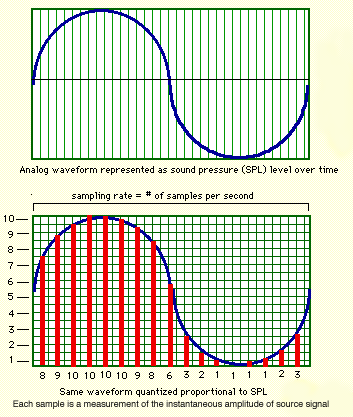 --- # Sampling rate - 44.1 kHz or more - Typically stereo - Maybe mono - 16 bit or more --- # Sampling rate differences .pull-left[ - Sampling rate 44.1kHz <audio controls> <source src="audio/sampling-44-1.wav" type="audio/wav"> </audio> - Sampling rate 22.05kHz <audio controls> <source src="audio/sampling-22-05.wav" type="audio/wav"> </audio> - Sampling rate 11.125kHz <audio controls> <source src="audio/sampling-11-025.wav" type="audio/wav"> </audio> ] .pull-right[ - Sampling rate 5.5125kHz <audio controls> <source src="audio/sampling-5-5125.wav" type="audio/wav"> </audio> - Sampling rate 4kHz <audio controls> <source src="audio/sampling-4.wav" type="audio/wav"> </audio> ] --- # Basic audio setup <!-- [Zoom H4n $299](https://www.bhphotovideo.com/c/product/1253811-REG/zoom_h4npro_4_channel_handy_recorder.html?sts=pi) --> - [Tascam DR100MKIII $399](https://www.bhphotovideo.com/c/product/1263849-REG/tascam_dr_100mkiii_linear_pcm_recorder.html) - [Audio-Technica Stereo Microphone $249 ](https://www.bhphotovideo.com/c/product/761016-REG/Audio_Technica_AT2022_AT2022_X_Y_Stereo_Microphone.html) - [Stereo XLR cable $24.95](https://www.bhphotovideo.com/c/product/994801-REG/rode_nt4_dxlr_cable_5_pin_stereo_xlr_cable.html) - [Panasonic eneloop pro charger & batteries $52.99](https://www.bhphotovideo.com/c/product/1258154-REG/panasonic_k_kj17khc82a_eneloop_pro_high_capacity.html) - [(2) SanDisk 16GB $21.94](https://www.bhphotovideo.com/c/product/1182600-REG/sandisk_sdsdxne_016g_gnci2_extreme_16gb_sdhc_u3.html) - [Sony closed-back headphones $79.99](https://www.bhphotovideo.com/c/product/49510-REG/Sony_MDR_7506_MDR_7506_Headphone.html?sts=pi) **Total = 827.87**