class: center, middle, inverse, title-slide # Dynamic Documents in RStudio ## LSA 2019 ### Bradley McDonnell<br/>University of Hawai‘i at Mānoa ### 2019/01/03 (updated: 2019-01-03) --- <style> code.md{ font-size: 10pt; } </style> # Dynamic documents - "Dynamic documents" was coined by Yihui Xie for the R package `knitr` based on earlier versions of `Sweave` - `knitr` allows us to create documents in various formats (e.g., LateX, Markdown) with various outputs (HTML slides, `Shiny` apps, PDF documents), all of which combines Markup and executable code.  - In the breakout section, we'll primarily work with **R Markdown**, an *R-flavor* of traditional Markdown. --- class: center, middle <iframe src="https://player.vimeo.com/video/178485416?color=428bca&title=0&byline=0&portrait=0" width="640" height="400" frameborder="0" webkitallowfullscreen mozallowfullscreen allowfullscreen></iframe> <p><a href="https://vimeo.com/178485416">What is R Markdown?</a> from <a href="https://vimeo.com/rstudioinc">RStudio, Inc.</a> on <a href="https://vimeo.com">Vimeo</a>.</p> --- # Benefits & drawbacks of RMarkdown .pull-left[ - It's simple - It's portable - Produces reproducible documents - Outputs to various static and dynamic formats - ... ] .pull-right[ - Few native formatting options - e.g., interlinear glossed examples not straightforward - Yet another flavor of Markdown - Not widely used in linguistics - ... ] --- # Breaking down the components of a dynamic document with RMarkdown Dynamic documents are composed of: 1. YAML header 2. R code chunks 3. Text --- # YAML header The YAML header contains... 1. **metadata** - author - title - date 1. **output formats** - HTML - Markdown - PDF - Word Here's a basic example... ```yaml --- title: "A basic example" author: "Bradley McDonnell" date: "12/29/2018" output: html_document --- ``` --- # YAML header The YAML header can be quite complicated. - The `output` can contain a number of options (which can be quite helpful!). ```yaml --- title: "Dynamic Documents in RStudio" subtitle: "LSA 2019" author: "Bradley McDonnell<br/>University of Hawai‘i at Mānoa" date: "2019/01/03 (updated: 2019-01-03)" output: xaringan::moon_reader: lib_dir: libs nature: highlightStyle: github highlightLines: true countIncrementalSlides: false --- ``` --- # Code chunks - Code chunks contain the R code that we want to execute. ````md The plot below shows a slight increase in intensity in the final syllable of the word. ```{r boxplot, echo=TRUE, comment="#", message=FALSE, fig.height=6} library(tidyverse) # Loading the dataframe pse_stress <- read_tsv("data/pse-stress-simplified.csv") %>% mutate(Word = fct_recode(Word), Position = fct_recode(Position), Vowel = fct_recode(Vowel), Weight = fct_recode(Weight), Focus = fct_recode(Focus), Final = fct_recode(Final) ) # A simple boxplot of intensity int <- ggplot(pse_stress, aes(Position, Intensity)) int + geom_boxplot() ``` ```` --- # Code chunks The plot below shows a slight increase in intensity in the final syllable of the word. 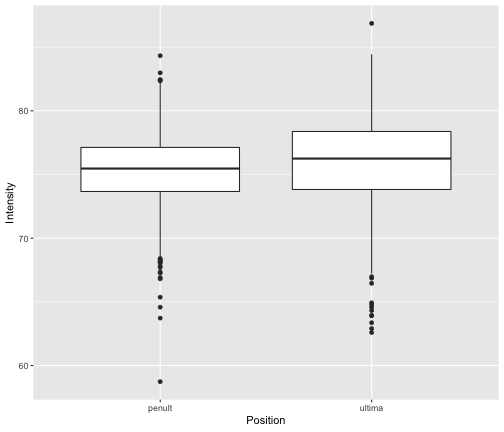<!-- --> --- # Anatomy of a code chunk - Code chunks are marked by ` ``` ` at the start and end of the chunk. - Followed by the specification of the programming language, - `r` or `{r}` in our case - Optionally followed by a name for the code chunk, and - many options for how the code chunk is treated. - Finally, the code itself! ````markdown ```{r boxplot, echo=FALSE, comment="#", message=FALSE, fig.height=6} # A simple boxplot of intensity int <- ggplot(pse_stress, aes(Position, Intensity)) int + geom_boxplot() ``` ```` **Note it's also possible to set Global Options that apply to all code chunks.** ````markdown ```{r setup, include=FALSE} knitr::opts_chunk$set(echo=FALSE) ``` ```` --- # Text - The text would ideally be R Markdown... - but it's possible to also use LaTeX - Or it's possible to mix in HTML formatting - and/or LaTeX code in with R Markdown --- class: center, middle # Questions? ??? Go to an example and open it up.